This is part 2 of Implementing a Logo Interpreter. Refer to Implementing a Logo Interpreter 1 for the first part.
The drawing part is the most interesting part, you get to see the results of your work. Pat yourselves on the back to those of you who made it till here.
Editor
- The editor is a simple
<textarea>element, with two buttons- theexportBtnand therunBtn. - The
exportBtnexports the graphics drawn on the canvas as a PNG file.
exportBtn.addEventListener("click", () => {
  const img = canvas.toDataURL("image/png")
  const downloadLink = document.createElement("a")
  downloadLink.href = img
  downloadLink.download = "canvas.png"
  downloadLink.click()
})- The
runBtnis responsible for running the Tokenizer and the Parser for the Logo code inside the<textarea>, and to draw the graphics on the screen.
runBtn.addEventListener("click", () => {
  let editor_content = editor.value
  editor.value = ""
  const t = new Tokenizer(editor_content)
  const p = new Parser(t.tokens)
  clearscreen(ctx, canvas)
  home(turtle, canvas)
  draw(p.getAST())
})
Canvas
Below are the Canvas API methods that we’ll need to draw stuff on the screen.
| Name and syntax | What it does |
|---|---|
beginPath() | Begins a path or resets the current path. |
moveTo(x, y) | Sets the start-point of the line in the canvas |
lineTo(x, y) | Sets the end-point of the line in the canvas |
stroke() | Draws the line. The default stroke color is black |
clearRect(x1, y1, x2, y2) | Clears specified pixels on the canvas. |
As we can see, we need the (X, Y) coordinates for the lines. We also need an angle because commands like RIGHT and LEFT shift the turtle’s position by n amount.
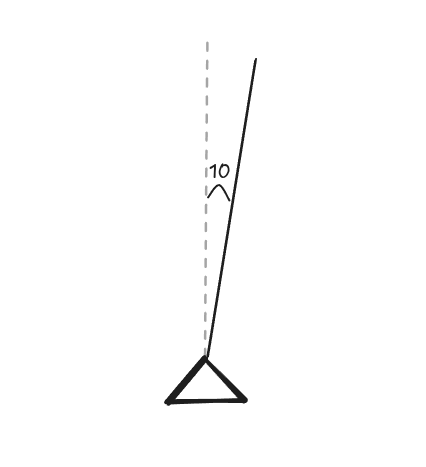
RT 10 FD 10 will result in the following:
Initial experiments with the Canvas API revealed some interesting findings. I was convinced that I needed to convert polar coordinates to cartesian coordinates and vice versa every time I wanted to execute a drawing function.
\\begin{aligned} x &= r \cdot \cos(\theta) \\ y &= r \cdot \sin(\theta) \\ r &= \sqrt{x^2 + y^2} \\ \\theta &= \tan^{-1}\left(\frac{y}{x}\right) \\end{aligned}However only one of these was needed. This is because (X, Y) remain constant throughout and the direction may or may not change. And the Canvas primarily works on Cartesian coordinates.
I think I might have the drawing part figured out for simple commands. Thought of storing the coordinates in polar form first but since I'll have to recalculate them each time, decided to go with cartesian instead.
— syswraith (@syswraith) October 16, 2025
This is fun! pic.twitter.com/uxZcx2itmY
Functions and their explanation
| Function or parameters | Description |
|---|---|
toRadians(angle) | Converts an angle measured in degrees to its equivalent value in radians. |
computeVector(angle, distance) | Calculates a directional displacement vector based on the given angle and distance. |
moveTurtle(turtle, dx, dy) | Updates the turtle’s position by applying the specified horizontal and vertical offsets. |
drawLine(x1, y1, x2, y2) | Renders a line segment between two coordinate points when the pen state is enabled. |
forward(turtle, distance) | Advances the turtle by a specified distance and draws the corresponding line if the pen is active. |
penup(turtle) | Sets the turtle’s pen state to disabled, preventing drawing operations. |
pendown(turtle) | Sets the turtle’s pen state to enabled, allowing drawing operations. |
clearscreen(ctx, canvas) | Clears all rendered content from the canvas surface. |
home(turtle, canvas) | Resets the turtle’s position to the center of the canvas and its orientation to the default angle. |
setxy(xcoor, ycoor) | Assigns an absolute position to the turtle using the provided coordinates. |
How REPEAT is implemented
case 'REPEAT':
Selects the handler for a parsedREPEATcommand.const [count, ...body] = node[1];Destructures the instruction arguments:countis the number of iterations.bodyis an array of commands to be executed repeatedly.
for (let i = 0; i < count; i++) draw(body);
Executes the instruction body exactlycounttimes by passing it todraw.break;
Exits the switch statement after the loop completes.